Azure Static Web Apps: One deleted function takes down the whole API
Every API route in your Azure Static Web App is failing with an empty body, even though the deployment was successful and you only deleted a function. Even ping, whose handler has no dependencies and returns a hard-coded HTTP 200, is affected. The problem is caused by a single line left behind when you deleted the function: main in api/package.json still points to the file of the deleted function.
In September 2026, I tracked down the cause in a thread on Microsoft Q&A and then reproduced it on my own Static Web Apps, using both Node.js programming models. The apps were deployed using both GitHub Actions and the SWA CLI. The error behavior depends on the model version. In v3, every route returns an HTTP 500, even though the portal lists all functions. In v4, every route returns an HTTP 404, the portal doesn't show any backend, and Application Insights is blocked. Here you can see both failure patterns, why two seemingly obvious isolation tests fail to identify the cause, and how you can access the error message that the Static Web App doesn't display.
Contents
Two failure patterns, one cause
Both reproductions are set up identically: three functions that return a hard-coded HTTP 200, Node 20 using platform.apiRuntime in staticwebapp.config.json, and in api/package.json, a field "main": "create-checkout-session/index.js" for a file that no longer exists.
v3: one folder with function.json per function |
v4: registration via app.http(...) |
|
|---|---|---|
| Response of each API route | HTTP 500, Content-Length: 0 |
HTTP 404, Content-Length: 0 |
| "APIs" blade | Function App "(managed)", all functions listed | no backend |
| "Application Insights" blade | can be enabled | blocked |
| Deployment | successful | successful |
In v3, the portal appears to show a working app. The "Backend Details" section lists each function by name, but each of them returns an HTTP 500:

In v4, however, the backend disappears from the "APIs" blade, and the Application Insights blade cannot be enabled:

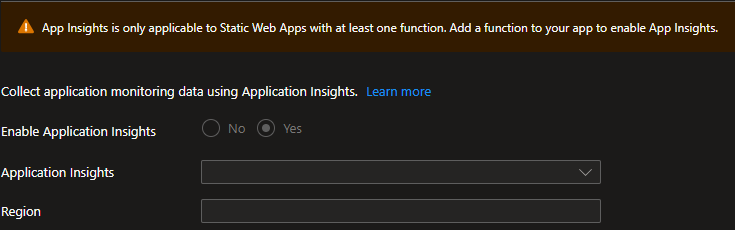
The message reads "App Insights is only applicable to Static Web Apps with at least one function. Add a function to your app to enable App Insights." This is the beginning of the dead end described in Azure/static-web-apps#1731: Without Application Insights, there are no logs for managed functions.
The metrics of the Static Web App don't help much in telling the two apart. In the v3 reproduction, FunctionHits remained at zero, while FunctionErrors counted the failed calls. In the thread, both were at zero. The metric description doesn't specify where the counting takes place.
The case from the thread
In the thread, all three routes of the Static Web App returned an HTTP 500 with no body. The "Backend Details" section listed create-payment-intent, ping, and update-payment-intent, and the deployment via GitHub Actions was successful. This matches the v3 failure pattern observed in the reproduction. The user did not specify the model, but the fix points to v3: removing main made everything work. Reproduced locally with Core Tools, a v3 app without main runs with all functions, while a v4 app without main ends with "No job functions found" and HTTP 404.
One observation from the thread doesn't fit either failure pattern: according to the user, the Application Insights blade had been blocked for over a week, even though the functions were listed. In my reproductions, the blade is blocked only when no function is listed. Neither a fresh deployment nor the path from the thread, a working app first and then the deleted function, blocked it in v3. So the block in the thread had a second cause that I couldn't reproduce. It first led to the hypothesis of a broken resource. That hypothesis was wrong.
Two isolation tests that found nothing
The first test in the thread removed the two functions with Stripe dependencies from the deployment, leaving only ping. The result remained unchanged: HTTP 500 with no body. This seemed to rule out the application code as the cause.
The second test explicitly set the runtime to Node 20 instead of the previously used Node 22, also without effect:
{
  "platform": {
    "apiRuntime": "node:20"
  }
}
Both tests made sense, and both had the same gap. They varied the function code and runtime, but left api/package.json unchanged in the package. That's where the problem lay.
Why does a function without dependencies fail too?
When main is set, the Node.js worker loads the files specified by that field during startup in both programming models. In the v4 programming model, these files register the functions using app.http(...). In v3, the app doesn't need this field for its functions, but the worker still loads the specified files.
If no file matches main, the worker reports Worker was unable to load entry point "create-checkout-session/index.js": File does not exist. On Node.js 20 and later, this error always blocks, regardless of the model (loadEntryPointFile and shouldBlockOnEntryPointError in the Node.js worker). Those are the only versions Static Web Apps supports for managed APIs. Both tests in the thread ran on Node 20 or 22. The worker does not crash. What happens next depends on how the host discovers the functions:
- In v3, the host reads the functions directly from the
function.jsonfiles. It knows about all three, the portal lists them, and each invocation is mapped to a known function. However, the worker cannot load the function's code, so every invocation fails with the error from the entry point. The result for the caller is an HTTP 500. - In v4, the host queries the worker for the functions, and the worker responds with the error. The host then knows about no functions at all, not even those that are unrelated to the missing file. Every route is unknown. This results in the missing backend in the portal and an HTTP 404 for the caller.
The ping-only test could not reveal this because package.json with the outdated main was still present in the deployment. An isolation test only disproves what it actually varies.
One detail that cost the thread three days: A main pointing to a deleted function survives every refactoring unnoticed. The Oryx build in GitHub Actions reports "Function Runtime Information. OS: linux, Functions Runtime: ~4, node version: 20" and doesn't flag the outdated main. The deployment is successful, both through Actions and the SWA CLI.
How to get the error message
Managed Functions in Static Web Apps do not have a log stream or a Kudu console. According to the documentation, logs are only available if you add Application Insights.
If Application Insights is blocked, as in v4 or in the thread, the documented approach doesn't work. The section No functions found in the Node.js troubleshooting, which describes errors in the entry point, also relies on Application Insights logs.
The quickest way is not through Azure. The error occurs in the Node.js worker, which runs the same way locally. Start the api/ folder with Core Tools and FUNCTIONS_WORKER_RUNTIME set to node in local.settings.json. Use Node 20 or later so that the error blocks locally the same way it does in the Static Web App:
cd api
func start
In both reproductions, the message appeared immediately at startup in the log, using Core Tools 4.13.0 and Node 24:
Worker was unable to load entry point "create-checkout-session/index.js": File does not existIn v4, it was followed by "No job functions found"; in v3, by "Worker failed to load function" for each function.
If the local start doesn't show anything, perhaps because the error is related to the environment in Azure, deploy the api/ folder unchanged as a standalone function app, with Node 20 and Application Insights enabled from the beginning. There, ping also fails, but the exceptions table contains the reason:
exceptions
| where timestamp > ago(1h)
| project timestamp, type, outerMessage, innermostMessage
| order by timestamp desc
In the v3 reproduction, there was a Microsoft.Azure.WebJobs.Script.Workers.Rpc.RpcException with the same message as locally, and an "Exception while executing function: Functions.ping" entry for each invocation. It took less than ten minutes from az functionapp create to the first line in exceptions. In the thread, the same table led to the outdated main.
Three checks before the next code change
If every API route in your Static Web App fails with an empty body, including a function without dependencies, you'll be faster with three checks than with any change to the function's code:
- Check the
api/package.jsonfieldmain
Not only whether the target exists, but what it actually matches in the deployment. In v4, the path or glob pattern must exactly match the files that callapp.http(...). In v3,mainis not needed for your functions. If it's a leftover, remove it. - Match the failure pattern
An HTTP 500 with the functions still listed matches the v3 failure pattern reproduced here: the error affects every invocation. An HTTP 404 with no backend and a blocked Application Insights matches the v4 pattern: the error occurs before the host knows about a single function. If a function without dependencies fails too, in either case, first look for the problem in what the app loads at startup, not in the individual handler. - Get the error message
First, start theapi/folder locally with Core Tools using Node 20 or later. If the reason remains unclear locally and you can't enable Application Insights on the Static Web App, deploy the same folder as a standalone function app with Application Insights and read theexceptionsandtracestables.
Wrapping up
On Node.js 20 and later, a main in api/package.json that points to a deleted file takes down the entire API of a Static Web App. The build and deployment processes report no errors. In v3, every route returns an HTTP 500, even though the portal lists all the functions. In v4, every route returns an HTTP 404, the portal doesn't show any backend, and Application Insights is blocked. A local start with Core Tools already shows you the message Worker was unable to load entry point "…": File does not exist in both models. In Azure, a standalone function app with the same api/ folder made it visible in Application Insights for v3.
The thread ended with one line fewer in package.json. By then, a support case was already open, and the Q&A thread had taken four rounds over three days. Checking main at the beginning would have resolved the issue in minutes.
One question remains unanswered: If you encountered a blocked Application Insights blade while seeing listed functions and identified the cause, I would be interested to know what that cause was.
References
- API support in Azure Static Web Apps with Azure Functions
- Migrate to v4 of the Node.js model for Azure Functions
- Troubleshoot Node.js apps in Azure Functions: No functions found
- Azure Functions Node.js worker: startApp.ts (entry point loading)
- Azure Static Web Apps metrics
- Azure/static-web-apps issue #1731
- Microsoft Q&A: Static Web App: API routes return 500 error without invoking functions