Fabric: The Hidden Destination
Microsoft Fabric is often treated as the end of the data pipeline, which becomes a problem when operational systems need those same events in real time. Azure workloads can subscribe to Fabric events in near real time once you add the EventStream destination many implementations overlook: a custom endpoint.
In this article, I'll show you how to set up Fabric as an event source for Azure services. We'll look at where the default configuration reaches its limits, why a unified namespace helps keep routing manageable, and how you can forward Fabric events to Azure workloads—all without creating duplicate ingestion paths or query jobs.
Microsoft Fabric overview
Fabric is the all-in-one analytics platform from Microsoft. Instead of combining Synapse, Data Factory, Stream Analytics, and Power BI yourself, you buy a capacity and get a set of workloads that all share the same storage layer.
Microsoft OneLake is a unified data lake for your whole organization. It's a central repository where you can store, manage, and govern all your data for analytics and AI workloads across the organization. (https://learn.microsoft.com/en-us/fabric/onelake/onelake-overview)
Data Engineering, Data Factory, Data Warehouse, Databases, Real-Time Intelligence, and Power BI are all just solutions on top of that. The Fabric item you create in a workspace determines which experience you land in.
The Real-Time Intelligence workload offers you the following practical building blocks:
- EventStream
A pipeline that could transform events ingested by various sources and write them to one or more destinations. - Eventhouse A database designed for storing and analyzing streaming data , allowing update policies to transform data easily when ingested.
- Activator
An engine that watches a stream for conditions and triggers alerts, Power Automate flows, or Fabric jobs. - Real-Time Dashboard
A dashboard enabling monitoring based on KQL queries against an Eventhouse without the need to create a full Power BI report. - Digital Twin Builder
A Fabric component for mapping telemetry data and properties from multiple sources to twin instances in a graph of your physical assets and processes.
The Real-Time Hub builds the tenant-wide catalog of accessible streams anyone has published, so you can discover streams instead of manually looking for connection strings.
That stack is very good at getting data in. Ingest, transform, store, visualize, alert. The real payoff comes when you send the right events back out, so the operational side can act on Fabric output in near real time.
The weakness in integration
Making an Azure-hosted application respond to events produced by a Fabric EventStream can be tricky. The typical architecture looks like this, and the gap is obvious: it moves data into Fabric well, but leaves operational systems without a direct event source.
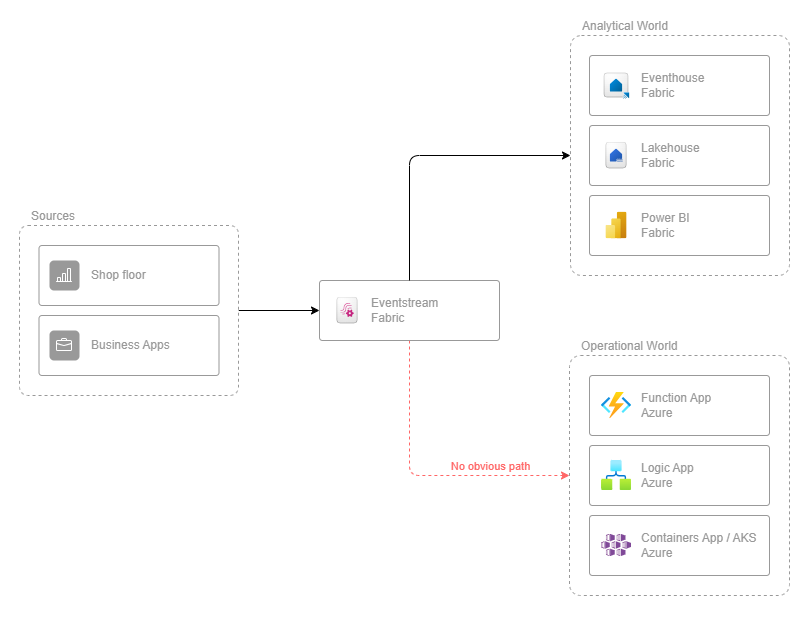
Everything from the sources flows nicely into the analytical world. The operational world in the diagram — an Azure Function reacting to a single event, a Logic App running a workflow, a service in Container Apps or AKS updating its own state — is built to react to events. But by default none of them has anything to subscribe to. The destinations people reach for first — Eventhouse, Lakehouse, Activator — don't hand events off to Azure core services.
Fabric can emit events, but most people never look past the destination side of an EventStream. The payoff of going further is that Fabric no longer remains an analytical island. It can feed Azure services in near real time, allowing operational systems to react without extra ingestion paths.
The case for a Unified Namespace
If you've worked in the industrial IoT space before, you've probably come across the Unified Namespace (UNS). In a UNS, each system publishes states and events in a single, shared, structured namespace. In practice, this is usually an MQTT topic hierarchy like this:
enterprise/site/area/line/tagTags are published via the hierarchical path and can be subscribed to at whatever level of the hierarchy is required for the use-case. Point-to-point integrations can be avoided. A UNS gives you three properties that are exactly what this system needs. A routing key like enterprise/site/area/line/tag that contains asset identity and location. You can map it directly to an Event Grid subject and let subscribers filter by prefix without first parsing the payload. The second pillar is self-describing events, so analytical and operational consumers read the same fields. Fabric becomes one subscriber among many, not the central system every other app has to query.
If you're building this system from scratch, model the UNS first and treat Fabric as a consumer of the UNS. If your events already arrive in Fabric in another format, the mapping described below still works. You'll have to describe the routing key yourself.
One shortcut worth knowing about
You don't have to bring your own broker. Event Grid's own MQTT broker — a namespace with MQTT enabled — can be the UNS itself. EventStream has a native Azure Event Grid Namespace source that ingests MQTT telemetry and CloudEvents directly. This avoids the need for a custom endpoint and a Function App for ingress. Event Grid routing can push the same messages directly to a topic for operational consumers, without a Fabric round-trip.
That shortcut only ever relays what a producer already published, though. It has no opinion on anything Fabric itself produces, such as an Activator alert, an hourly average from a KQL query, or a Digital Twin Builder state change built from three streams and a lookup table. None of that exists as a message anywhere upstream, so there's nothing for native MQTT routing to forward — it only runs on the ingress side of the pipe, before Fabric has done any work. Getting Fabric's own output back out is the actual problem this article solves, and it's the one leg no amount of broker choice removes.
Getting events out of an EventStream
An EventStream supports destinations such as Eventhouse, Lakehouse, Spark Notebook, derived stream, Activator, and the one we want: the custom endpoint. Microsoft describes it as the destination to use when you want to send live data to a system outside Microsoft Fabric.
When you add a custom endpoint destination and hit Publish, Fabric provisions an Event Hubs-compatible endpoint for you. In the Live View you select the destination tile and the Details pane shows protocol tabs (Event Hub, AMQP, and Kafka), each with a Basic page, a SAS Key Authentication page, and an Entra ID Authentication page.
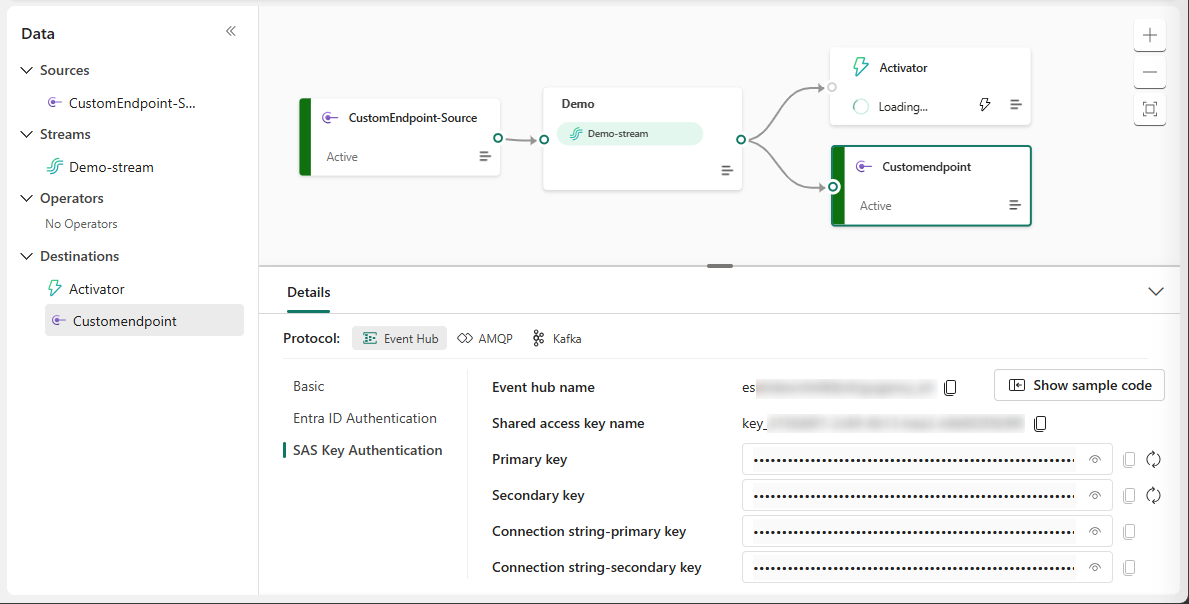
The Event Hub tab presents a connection string in the format:
Endpoint=sb://eventstream-xxxxxxxx.servicebus.windows.net/;SharedAccessKeyName=key_xxxxxxxx;SharedAccessKey=xxxxxxxx;EntityPath=es_xxxxxxxThat's a standard Event Hubs connection string, meaning clients that support Event Hubs will connect to your EventStream.
The Azure Functions Event Hubs trigger is one of them. For anything beyond a demo, use the Entra ID Authentication page instead of SAS keys, and grant your Function's managed identity access, which saves you from having to rotate secrets later.
Why put an Azure Function in the middle?
A custom EventStream endpoint sends events via AMQP or Kafka. Messages are exchanged in batches using partitions and offsets. In contrast, Event Grid is based on messages with a type and a topic, utilizing its own filters, retry mechanisms, and dead-letter mechanisms. For this reason, a Function that acts as a translator between these two models is needed. It makes Fabric events usable for Event Grid and provides Azure services with an elegant way to process them in near real time.
It's tempting to skip the Function and give every operational service its own consumer group on the custom endpoint. That solves fan-out — each consumer group gets an independent, full copy of the stream — but it doesn't solve routing. Every consumer still receives every event on every partition; there's no way to subscribe to just enterprise/site/area/line/* at the Event Hubs protocol level. Each service ends up parsing the entire stream, discarding most of it, maintaining its own checkpoint store, and requiring Entra ID access to the Fabric-side endpoint rather than a scoped Azure RBAC role on a topic.
This is what the MQTT shortcut can't take over. A raw reading forwarded untouched is one thing — but an Activator alert or a KQL aggregate exists only because Fabric computed it. Getting either onto the custom endpoint means looping it back through an Activator action first. There's no upstream message for native MQTT routing to relay instead.
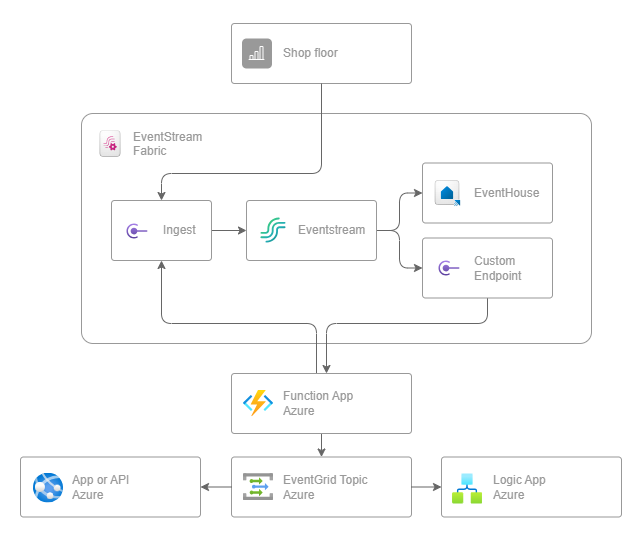
An Azure Function responds to an event source via bindings instead of polling it. Via EventHubTrigger binding, the Function reads batches from the EventStream. The trigger is coupled with the EventGridOutput binding, which publishes translated events to the Event Grid topic. This allows Fabric events to flow to Azure services without querying.
Starting with the Fabric-to-Event-Grid function, the EventHubTrigger fires once per batch of events it reads off the EventStream. In the example below, it's wired up with a connection string, an entity name, and a consumer group. Add the Event Grid topic on the output side, and that's everything the Function needs to configure:
{
  "Values": {
    "Fabric:Egress:EventHub:ConnectionString": "Endpoint=sb://eventstream-xxxxxxxx.servicebus.windows.net/;SharedAccessKeyName=key_xxxxxxxx;SharedAccessKey=xxxxxxxx",
    "Fabric:Egress:EventHub:Name": "es_xxxxxxx",
    "Fabric:Egress:EventHub:ConsumerGroup": "$Default",
    "EventGrid:Topic:Connection:topicEndpointUri": "https://uns-events.westeurope-1.eventgrid.azure.net/api/events"
  }
}
Connection on the EventGridOutput attribute selects identity-based auth, so there's no key in that setting. The Function's managed identity needs the EventGrid Data Sender role on the topic, same as the Entra ID route on the Event Hub side above.
One detail that costs people an afternoon:
Strip the EntityPath part out of the connection string. The Functions host wants the entity name in the trigger attribute, and a connection string that carries its own EntityPath will collide with it.
The EventStream trigger processes events in batches. From there, the Function maps the UNS topic to CloudEvent Subject and the last topic segment to CloudEvent Type.
public sealed class FabricToEventGrid
{
  [Function(nameof(FabricToEventGrid))]
  [EventGridOutput(Connection = "EventGrid:Topic:Connection")]
  public CloudEvent[] Run(
    [EventHubTrigger(
      "%Fabric:Egress:EventHub:Name%",
      Connection = "Fabric:Egress:EventHub:ConnectionString",
      ConsumerGroup = "%Fabric:Egress:EventHub:ConsumerGroup%")]
    EventData[] eventData,
    FunctionContext context)
  {
    var logger = context.GetLogger<FabricToEventGrid>();
    var cloudEvents = new List<CloudEvent>(eventData.Length);

    foreach (var eventItem in eventData)
    {
      var message = eventItem.EventBody.ToObjectFromJson<UnsMessage>();

      if (message is null || string.IsNullOrWhiteSpace(message.Topic))
      {
        logger.LogWarning("Skipping Fabric event because the payload cannot be parsed as a UNS message.");
        continue;
      }

      var eventType = $"enterprise.uns.{message.Topic.Split('/').Last()}";

      cloudEvents.Add(new CloudEvent(UnsConstants.FabricSource, eventType, message.Metric)
      {
        Subject = message.Topic,
        Time = message.Timestamp
      });
    }

    logger.LogInformation("Forwarding {Count} Fabric events to Event Grid.", cloudEvents.Count);

    return [.. cloudEvents];
  }
}

/// <summary>
/// Shape written to and read from Fabric's EventStream ingestion/egress endpoints.
/// </summary>
public sealed record UnsMessage(string Topic, DateTimeOffset Timestamp, UnsMetric Metric);

/// <summary>
/// Self-describing metric value, in the spirit of Sparkplug B's metric shape.
/// </summary>
public sealed record UnsMetric(string Name, string DataType, JsonElement Value, string? Unit = null);
Everything downstream uses the default Event Grid behavior, allowing a consumer to create its own subscription with filters, a retry policy, and a dead-letter target. Consumers don't require Fabric workspace permissions.
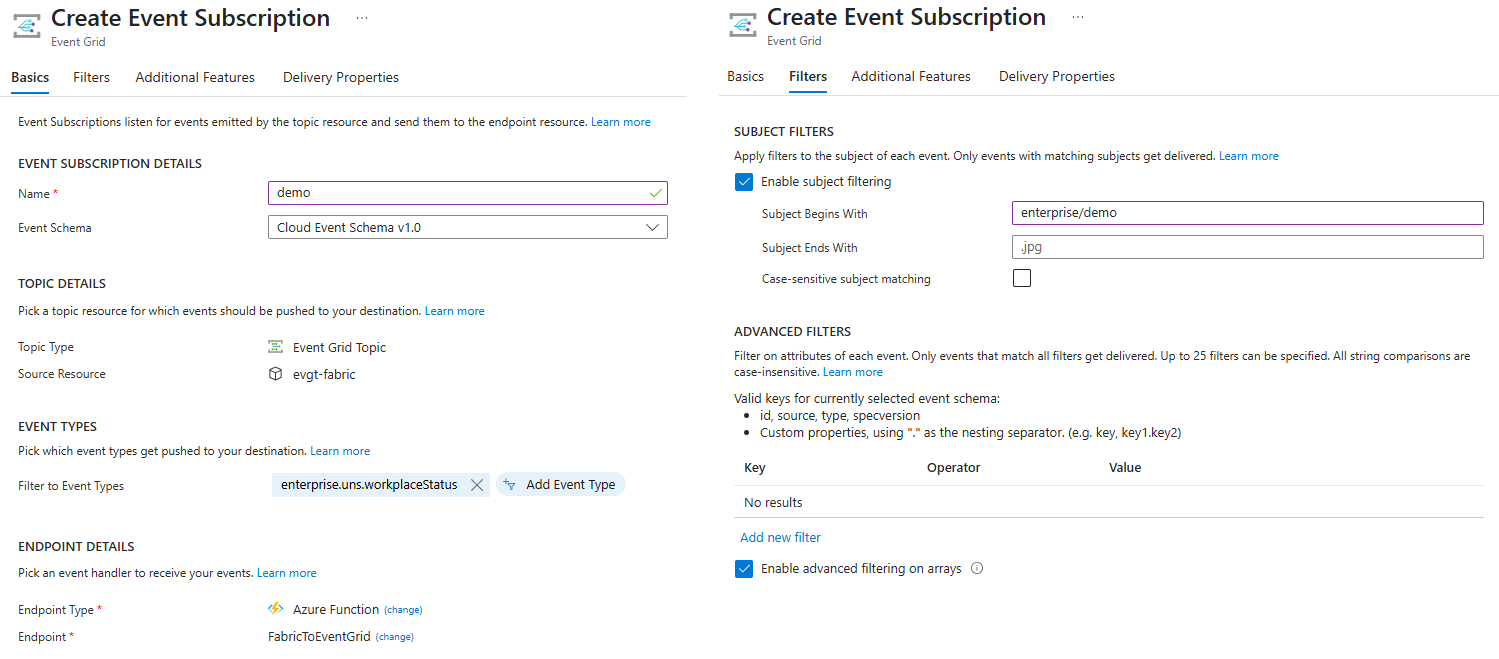
As shown in the screenshots above, you define the source topic, the schema, the event type filter (enterprise.uns.workplaceStatus), and the destination endpoint. Further, you can apply additional filters during subscription creation. For example, SubjectBeginsWith maps directly to your UNS prefix (for example, enterprise/demo/), so subscribers receive only events from the site scope they care about.
For the way back, the EventGridTrigger invokes the Function once per Event Grid event, and the EventHubOutput binding writes the result directly to the EventStream's ingestion endpoint.
This is half of the bridge the shortcut from earlier can replace: if your UNS already lives in an Event Grid namespace, point EventStream's native Azure Event Grid Namespace source at it and skip this function entirely.
{
  "Values": {
    "Fabric:Ingress:EventHub:ConnectionString": "Endpoint=sb://eventstream-xxxxxxxx.servicebus.windows.net/;SharedAccessKeyName=key_xxxxxxxx;SharedAccessKey=xxxxxxxx",
    "Fabric:Ingress:EventHub:Name": "es_xxxxxxx"
  }
}
public sealed class EventGridToFabric
{
[Function(nameof(EventGridToFabric))]
[EventHubOutput("%Fabric:Ingress:EventHub:Name%", Connection = "Fabric:Ingress:EventHub:ConnectionString")]
public string? Run([EventGridTrigger] CloudEvent cloudEvent, FunctionContext context)
{
var logger = context.GetLogger<EventGridToFabric>();
if (cloudEvent.Source.Equals(UnsConstants.FabricSource))
{
logger.LogWarning("Should not subscribe to self-published events. Ignoring...");
return default;
}
var data = cloudEvent.Data?.ToObjectFromJson<UnsMetric>();
if (data is null)
{
logger.LogWarning("Could not parse cloud event data due to invalid payload.");
return default;
}
if (cloudEvent.Subject is null)
{
logger.LogWarning("Could not parse cloud event data due to missing subject.");
return default;
}
var message = new UnsMessage(
Topic: $"{cloudEvent.Subject}/{data.Name}",
Timestamp: cloudEvent.Time.GetValueOrDefault(DateTimeOffset.UtcNow),
Metric: data);
return JsonSerializer.Serialize(message);
}
}Important to know for implementation
If you are considering building a solution based on the described scenario, there are some pitfalls to watch out for.
Delivery is at-least-once on both hops. The Event Hub trigger can replay a batch after a failure, and Event Grid retries on its own. The downstream handlers need to be idempotent.
Partition counts can change. Microsoft notes that a data client using custom endpoints might need updating when the EventStream's partition count increases, and that's much better to know now than to find out at three in the morning.
Event Grid bills per operation, so forwarding every raw sensor value straight through it charges you for events nobody consumes. Filter or aggregate within the EventStream first, and forward only the events that a business process actually reacts to.
Event Grid caps events at 1 MB, and the effective sweet spot is far below that, so send a reference to the Eventhouse row rather than the full document if your payloads are large.
Fabric capacity is consumed the whole time the EventStream runs. A custom endpoint destination is cheaper than a Lakehouse destination, but it still counts against your capacity.
The end-to-end path (UNS -> EventStream -> Custom Endpoint -> Function App -> Event Grid -> Subscriber) typically takes low single-digit seconds.
If you need milliseconds instead for events that don't require anything Fabric computes, subscribe to the broker directly - the shortcut from earlier - and let Fabric keep its own copy for analytics.
Wrapping up
With a custom endpoint and two Azure Functions, Fabric becomes part of your event-driven architecture. Microsoft Fabric stores the analytics copy in Eventhouse, and operational services subscribe to the data via Event Grid using the filters they need. This allows any Azure workload to respond to manufacturing events within seconds.
The complete sample, including the Terraform template for the Event Grid topic and a small MQTT publisher that fills the EventStream with UNS-shaped test data, is available on GitHub: Example of how to build bidirectional messaging between Fabric and Event Grid.
Once you use the custom EventStream endpoint as a bridge back to Azure services, there is no longer a hidden destination, and Fabric is no longer an analytical dead end. If you implement this pattern in your environment, I'd be interested to hear which parts worked well and where you had to make adjustments.
References
- What is Microsoft Fabric?
- What is OneLake?
- What is Real-Time Intelligence?
- Microsoft Fabric EventStreams overview
- Add and manage a destination in an EventStream
- Add a custom endpoint destination to an EventStream
- Configure settings for a Fabric EventStream
- Azure Event Hubs trigger for Azure Functions
- Azure Event Grid output binding for Azure Functions
- Event filtering for Azure Event Grid
- Overview of the MQTT broker feature in Azure Event Grid