HybridCache: The remove went through, the other instances still serve the old value
You call RemoveAsync, reload the page and see the new value. The next time you refresh, you see the old value again, and then the new value again. There are two replicas running behind the page, and only one of them has received the update to remove the value. The following image shows both replicas, named by the last five characters of their name, on a time axis since the removal. Each point is a response with the value served and its origin: L1 for the local cache, L2 for Redis, or the source.
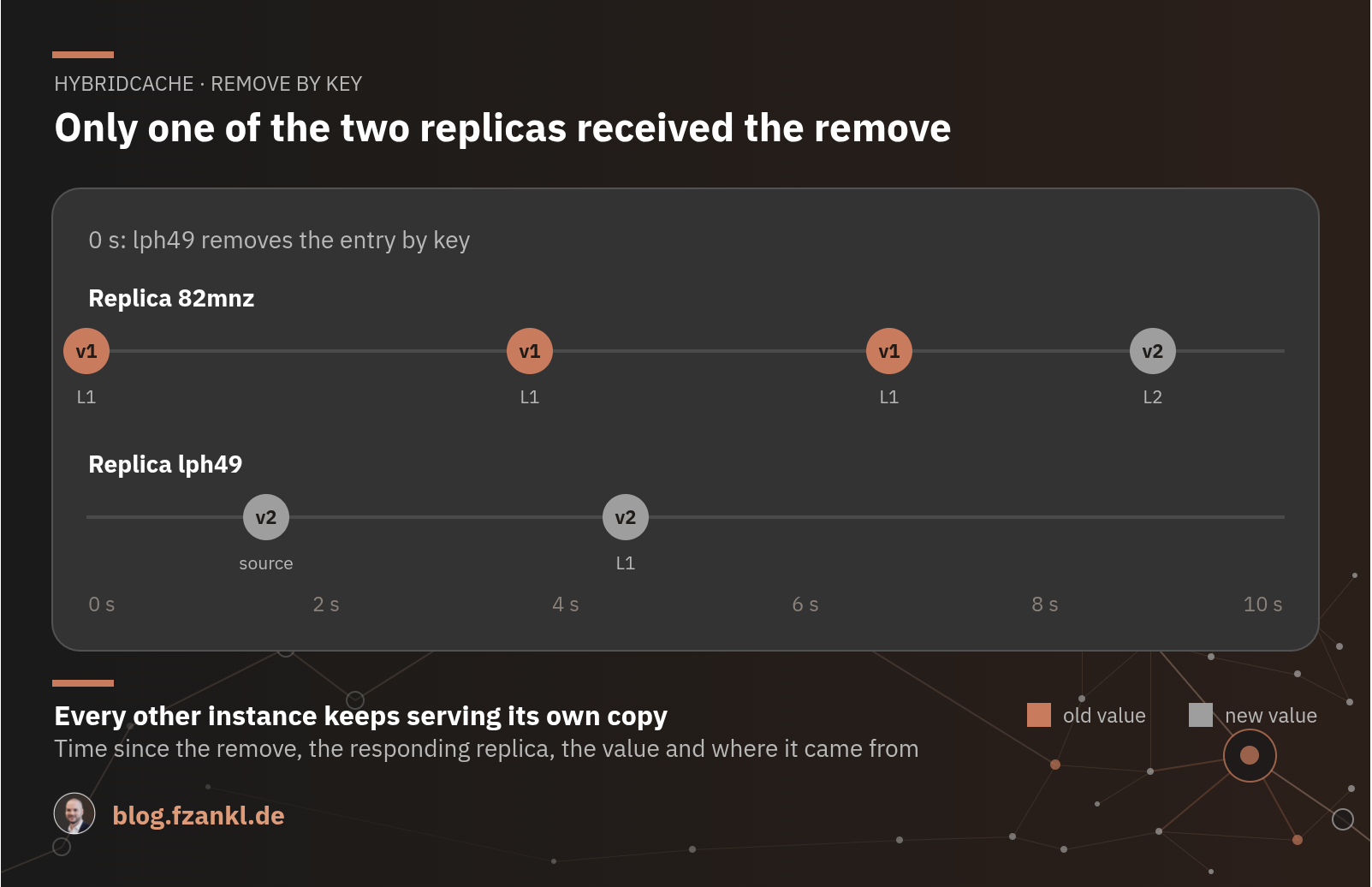
With HybridCache, a remove reaches both the instance that runs it and the distributed cache. Every other instance keeps serving its own copy: in the measurement for 9 seconds after a remove by key and for 59 seconds after a remove by tag. This article shows a measurement using Azure Container Apps with Azure Managed Redis and explains why, after a remove by tag, the old value outlives the local cache. It also demonstrates how the backplane of FusionCache, a pub/sub channel between instances, delivers the new value on the first access without requiring changes to your application code.
Contents
What a remove achieves
HybridCache stores each entry twice: in the instance's memory (L1) and in the distributed cache (L2), which is Redis. RemoveAsync deletes the entry in L2 and in L1 of the instance that made the call. The other instances are not aware of this. They continue to serve their L1 copy until LocalCacheExpiration expires, then they find nothing in L2 and reload.
RemoveByTagAsync deletes nothing because Redis cannot search for entries based on tags. The cache stores each entry as bytes under its key, and the tags are serialized within those bytes. There is no index for tags. Iterating through all keys for each tag invalidation would be too expensive. Therefore, the call leaves the entry in L2 and writes its own key next to it, which contains only a timestamp. Everything with this tag that is older than this timestamp is considered stale. This key is referred to as a "marker" in the following text. In Microsoft's implementation, it is __MSFT_HCT__<tag>, in FusionCache __fc:t:<tag>.
For Redis, the entry and the marker are two separate keys with no inherent connection. The association only exists within the respective library. When reading, an instance retrieves the entry, sees its tags in the deserialized data, and compares its age with the marker. If the entry is older than the marker, it reloads it from the source. This comparison requires the instance to know the current marker. This is the practical problem. Each instance reads the marker once from L2 and stores it in its own memory. An instance that already knows the tag does not read it again. When its L1 expires, it retrieves the old entry from L2, serves it, and keeps it for another L1 lifetime. This repeats until the L2 entry itself expires.
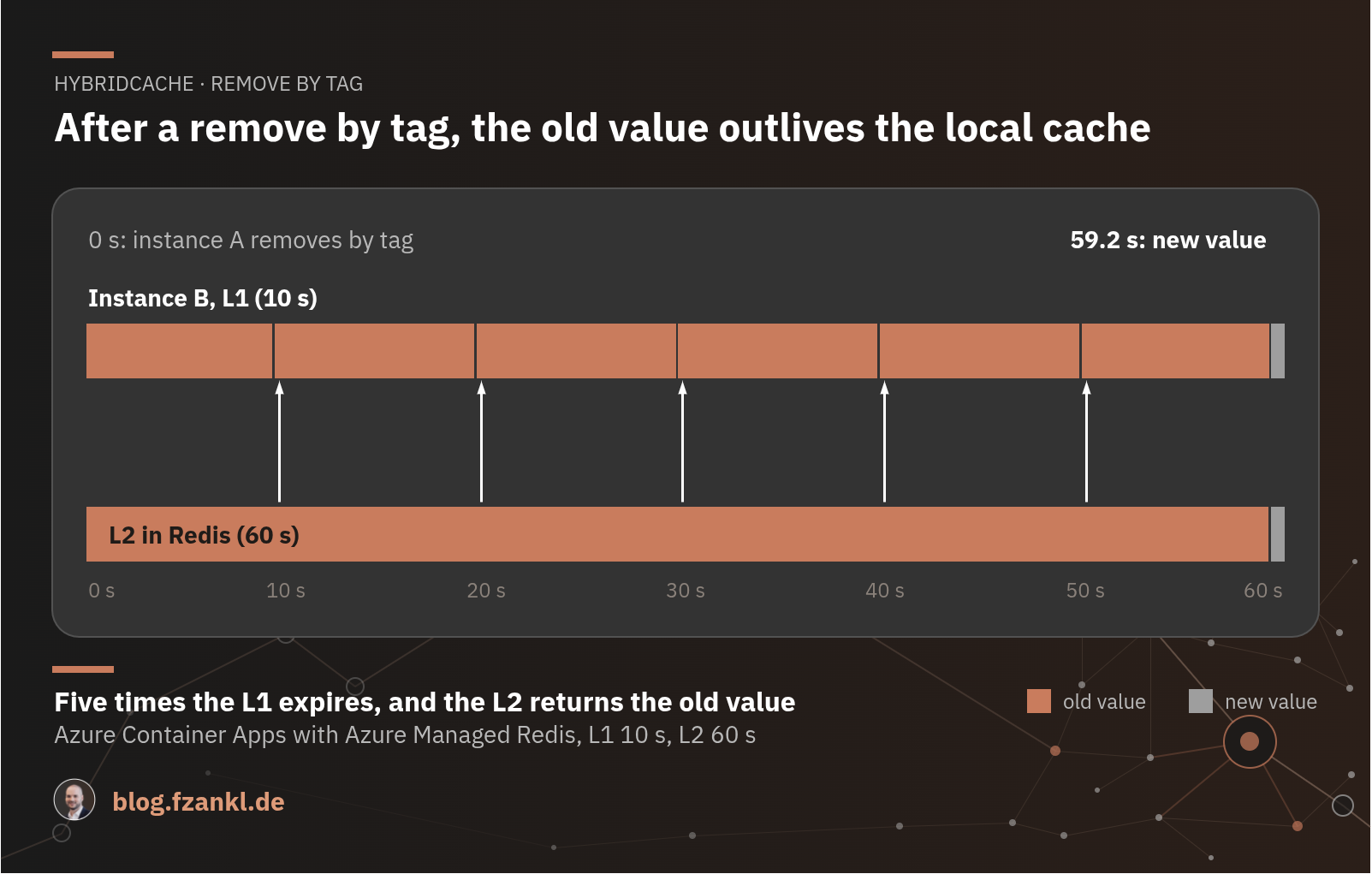
For Microsoft's implementation, this is evident in the source code. Each instance reads the timestamp of a tag once from L2, and after that, only a RemoveByTagAsync on the same instance can modify it. dotnet/extensions#7411 is open on this. For FusionCache, the documentation on tagging describes the same behavior for operation without a backplane.
The measurement
Two instances, A and B, each with its own L1, share a Redis instance as the L2. Both instances read a product. The source changes from v1 to v2, and instance A removes the entry. Subsequently, instance B reads the data every 100 milliseconds until it returns v2. Each response indicates whether the value originated from the L1, the L2, or the source.
The environment consists of Azure Container Apps in West US (each instance has exactly one replica) and Azure Managed Redis (Balanced_B0, Redis 7.4, OSSCluster). West US is the region because that is where Balanced_B0 had capacity at the time the measurement was executed. The versions measured are Microsoft.Extensions.Caching.Hybrid 10.10.0 and ZiggyCreatures.FusionCache 2.9.0, which runs behind the same API through AsHybridCache(). The two local runs replaced Container Apps and Azure Managed Redis with a redis:8.6 container started by Aspire 13.4.6 on Windows 11. All variants use a LocalCacheExpiration of 10 seconds and an Expiration of 60 seconds.
The table shows how long it took for instance B to start returning v2 after instance A removed the entry:
| Case | Microsoft | FusionCache with backplane | FusionCache without backplane | Without backplane, tag marker 5 s |
|---|---|---|---|---|
| Remove by key | 9.0 s | first access | 9.2 s | 8.4 s |
| Remove by tag | 59.2 s | first access | 59.0 s | 4.4 s |
| Remove by tag, A reads afterwards | 9.0 s | first access | 9.0 s | 4.1 s |
Remove by key, per-call options only Expiration |
59.2 s | first access | 59.0 s | 59.0 s |
The first three columns are from a deployment on September 29th, and the last column is from a second deployment on October 2nd. The three variants that were running in both deployments differed by a maximum of 0.3 seconds.
With a backplane, instance B returned v2 on the first access in every case. Without a backplane, there is nothing in either implementation that notifies the other instance, and the two differ by a maximum of 0.2 seconds. The values are slightly below 10 and 60 seconds because the timer only starts after the removal. Instance B loaded its copy before that, and this fraction of a second is missing from the measurement. Locally, with the scenario running on the same machine, the values were 10.0 and 60.0 seconds. These are upper limits, as the scenario removes the entry immediately after loading it, and in practice a remove hits a copy at any point, after part of its lifetime has already passed.
The third row explains why the stale window often looks shorter in production. If instance A reads the data itself after the remove by tag, it reloads the data and writes v2 to the L2. Instance B then finds the new value there once its L1 expires. The 59 seconds apply to all other instances as long as no instance reloads the entry and is aware of the invalidation.
Limitations of the measurement
The 10 and 60-second intervals are freely chosen for measurement. The time window after a removal is as long as the respective lifetime. With Microsoft's default values, 5 minutes for L1 and L2, the other instances provide data up to 5 minutes old. The scenario ran on a machine in Germany, with a median of 155 to 199 milliseconds per call. Therefore, B's first access arrives no earlier than about 0.2 seconds after the remove. The measurement in Azure does not show whether the backplane delivers the message after a few milliseconds or after 150 milliseconds. In both local runs, an outdated response was received after a remove by key, followed by the new response 100 milliseconds later.
With a backplane: FusionCache behind the HybridCache API
With AsHybridCache(), FusionCache runs as the implementation behind the HybridCache API. Its backplane is a pub/sub channel through which one instance informs the others that an entry has changed. A remove by tag is reported as a change in the marker. In this example, it runs on the same Redis instance that is already the L2:
builder.Services.AddFusionCache()
    .WithDefaultEntryOptions(new FusionCacheEntryOptions
    {
        Duration = expiration,
        MemoryCacheDuration = localCacheExpiration
    })
    .WithSerializer(new FusionCacheSystemTextJsonSerializer())
    .WithRegisteredDistributedCache()
    .WithBackplane(services => new RedisBackplane(new RedisBackplaneOptions
    {
        ConnectionMultiplexerFactory = () =>
            Task.FromResult(services.GetRequiredService<IConnectionMultiplexer>())
    }))
    .AsHybridCache();
The backplane does not transmit values. According to the documentation, a message only contains what is needed for synchronization and indicates whether an entry has been set, removed, or expired. In B's case, the message arrived before the first read access. After a remove by key, B found nothing in the L2 and loaded from the source. After a remove by tag, B found the old entry in the L2 and still loaded from the source. The backplane only transmits that something has changed. B retrieves the new value itself.
Your application code remains the same and continues to use the HybridCache API. With the configuration shown above, B returned v2 in all eight measured cases on the first access, after a remove by key and by tag, on Azure Managed Redis with OSSCluster.
The backplane is a separate package and a separate call. If you only register the L2 and omit WithBackplane, you will get the values in the "FusionCache without backplane" column of the measurement results shown above.
Microsoft's implementation does not have anything comparable in version 10.10.0. There, after a remove by key, all you can do is set LocalCacheExpiration to the longest time old values may remain. After a remove by tag, this does not help. There, Expiration applies.
Without a backplane, tag beats key
If your L2 does not have a backplane, FusionCache offers a setting for remove by tag. It determines how long an instance keeps a copy of a tag marker in the L1 before reading it again from the L2:
builder.Services.AddFusionCache()
    .WithOptions(options =>
        options.TagsDefaultEntryOptions.MemoryCacheDuration = TimeSpan.FromSeconds(5))
    .WithRegisteredDistributedCache()
    .AsHybridCache();
This allowed B to be updated after 4.4 seconds instead of 59 seconds after a remove by tag. The excerpt from a local run shows why:
-- source changed to v2, A removed the entry by tag --
  0.0 s  B -> v1 (l1)
  5.0 s  B -> v2 (source)
            L2 get v2:__fc:t:product-tag:3d84ad64 hit
            L2 get v2:product:3d84ad64 hit
            L2 set v2:product:3d84ad64
After just under 5 seconds, B's copy of the marker has expired. The next access reads the marker from the L2, sees that the entry is older, and loads from the source. B's own L1 entry would still be valid for 5 seconds at that time. As long as the entry lives longer than the marker, the window depends on the lifetime of the marker. A remove by key does not have this mechanism and remains at the L1 lifetime of 10 seconds. Without a backplane, remove by tag is therefore the faster method.
You don't always get to choose. A remove by key requires you to know every key affected. However, a product is rarely contained within a single entry: it's present on category pages, search results, and recommendations, whose keys the code that writes the product doesn't have. For these cases, tags are used. You can only invalidate these entries by tag anyway. With a short marker lifespan, it's worthwhile even for a single entry: give it its own tag, and the window will be tied to the marker's lifespan rather than the entry's.
The cost is read accesses on the L2, even if nothing changes. In 55 seconds without a remove, B made 39 L2 accesses with this setting, 7 to 9 without it. Every 5 seconds, the instance reads three markers: the tag marker and two others that FusionCache uses to detect a Clear() of the entire cache. This was measured using a single tag and Redis as the L2.
Per-call options: both values or none
If you provide custom HybridCacheEntryOptions values for a call and only specify Expiration, that value also applies to the L1. The globally configured LocalCacheExpiration does not apply to this entry.
// L1 lives 60 seconds, not the globally configured 10
new HybridCacheEntryOptions
{
  Expiration = TimeSpan.FromSeconds(60)
};

// L1 lives 10 seconds
new HybridCacheEntryOptions
{
    Expiration = TimeSpan.FromSeconds(60),
    LocalCacheExpiration = TimeSpan.FromSeconds(10)
};
That is why, in the last row of the table, B didn't access the L2 once in 59 seconds, both with Microsoft and through the FusionCache adapter. With a backplane, you won't notice this. B still gets the new value on the first access. Without a backplane, the 9 seconds after a remove by key become 59 seconds.
Wrapping up
With HybridCache, a remove reaches the instance that runs it and the L2. Without a backplane, the time during which the other instances serve stale data depends on the L1 lifetime after a remove by key and on the L2 lifetime after a remove by tag. The FusionCache backplane bridges this gap.
For your project, this means:
- With FusionCache and a backplane, a remove reaches the other instances, behind the same
HybridCacheAPI. Check ifWithBackplaneis included in your configuration. - If you don't have a backplane for your L2, remove by tag in FusionCache and give the tag markers a short
MemoryCacheDuration. - If you stay with Microsoft's implementation,
LocalCacheExpirationlimits the window after a remove by key. After a remove by tag, onlyExpirationdoes. - In the per-call options, specify both values or none.
The example project includes all variations behind an Aspire app host. You can reproduce the complete table locally in about six minutes, using a Redis container and without an Azure subscription.