
.NET 10 in Azure: A Path Through Your Estate
On November 10, 2026, .NET Conf will kick off with the release of .NET 11. On the same day, support for .NET 8 and .NET 9 will end. Whether that morning feels like a new beginning or a deadline depends on what you're running in your Azure environment.
The individual migration steps to .NET 10 are documented. Function Apps, Container Apps, and App Service each have their own migration documentation. If you're running more than one of these, you still need to decide which to migrate first. In this article, I'll show you a sequence for a complete Azure environment and how to execute the migration safely.
The focus is on three Azure application platforms: Function Apps, Container Apps, and App Service. If you're also running .NET on AKS or directly on VMs, the same runtime principle applies, but the rollout differs. On AKS, weighted traffic requires an ingress controller, service mesh, or rollout controller such as Argo Rollouts. Azure also has no platform-level record of the .NET runtime installed inside a VM. Both cases deserve separate treatment.
What expires in November?
On November 11, the day after the deadline, nothing suddenly stops working. Your applications will handle requests just as they did the day before. What stops is maintenance, which becomes critical when new vulnerabilities arise.
After that date, Microsoft will no longer provide servicing updates, security fixes, or technical support for these versions. We recommend upgrading to .NET 10, which is an LTS release supported through November 2028. Source: .NET 8 and .NET 9 will reach End of Support on November 10, 2026
At first, the dates seem contradictory. .NET 8 is an LTS release, whereas .NET 9 is not. But LTS means "longer," not "indefinite." For .NET 8, the standard 36-month LTS window applies from its release in November 2023. Starting with .NET 9, Microsoft has extended the STS window from 18 to 24 months. As a result, two different policies end on the same patch day.
Three dates belong in your schedule:
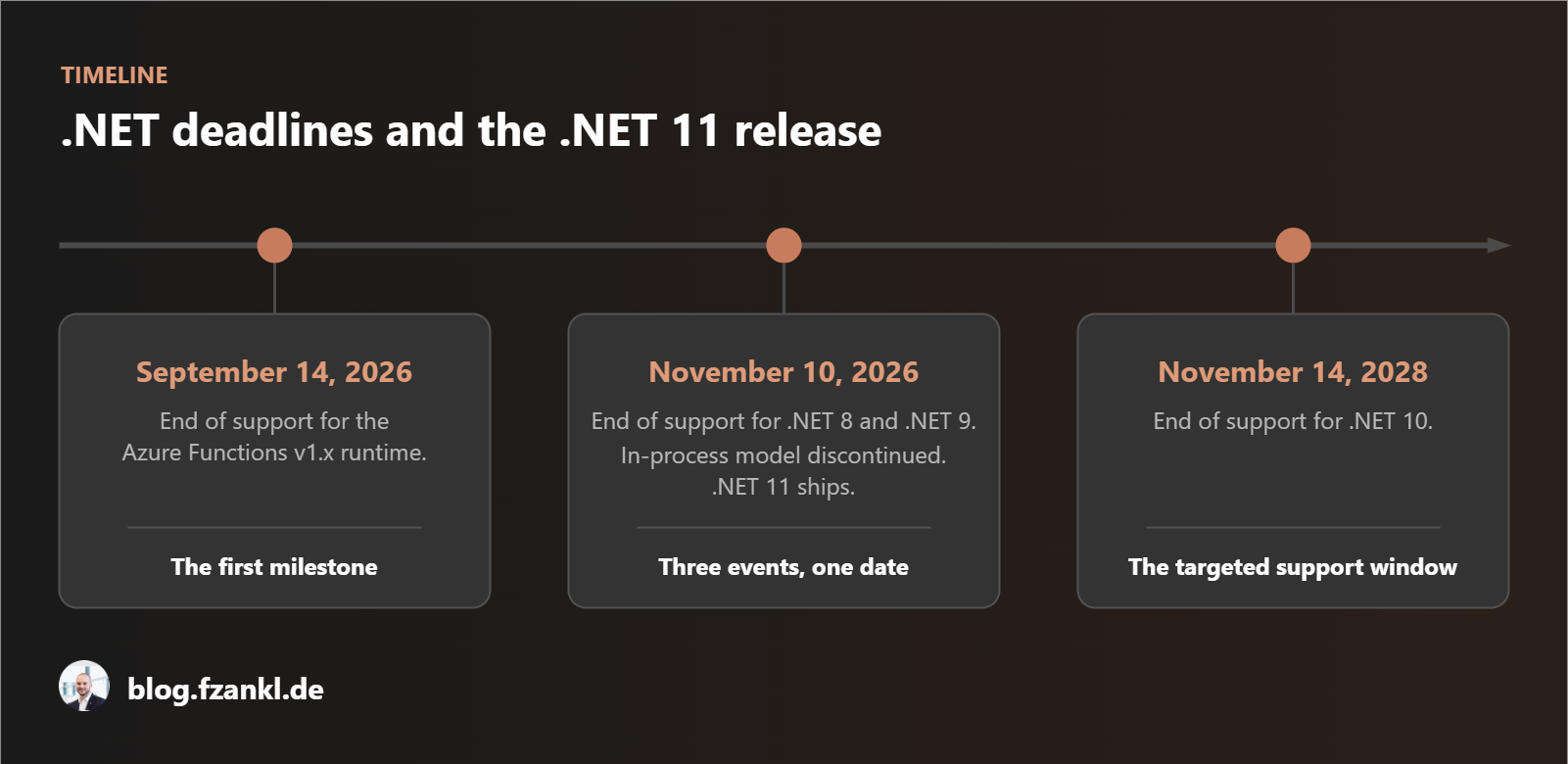
- September 14, 2026
End of support for version 1.x of the Azure Functions runtime.
If any v1.x applications are still running, this is the first milestone to be reached. - November 10, 2026
End of support for .NET 8 and .NET 9.
On the same day, support for the Azure Functions in-process model ends, and .NET 11 ships: three events, one date. - November 14, 2028
End of support for .NET 10.
This is the support window you are targeting.
Why .NET 11 is not the answer
Since .NET 11 is also scheduled for release on November 10, it might be tempting to skip a version and migrate directly to .NET 11. Dismiss that idea quickly. .NET 11 is a Standard Term Support release. It runs from November 10, 2026, through November 9, 2028. .NET 10 is LTS and officially runs until November 14, 2028. Based on current dates, waiting gives you a support window about five days shorter than migrating today.
There is also an Azure-specific issue. A new .NET release is not necessarily available on every Azure service that day. .NET 10 shipped on November 11, 2025, but general availability on Function Apps followed on February 19, 2026. Function Apps, App Service, and container images each follow their own schedule. A migration plan cannot assume that all three will be ready in the same week.
Step 1: Inventory what you actually run
Before touching any code, whether it is .NET, Bicep, or Terraform, take inventory of the deployed resources. Avoid doing this manually in a spreadsheet, because it's easy to miss at least one resource. Azure Resource Graph and the Azure CLI can automate most of the discovery.
You need two things before the queries below will run:
- Azure CLI
- Resource Graph extension
az extension add --name resource-graph
Sign in via the Azure CLI first, either as a user or as a service principal:
# Log in as a user
az login --tenant TENANT_ID

# Log in as service principal
az login --service-principal --username APP_ID --password CLIENT_SECRET --tenant TENANT_ID
You can then use a simple query to check the permissions and visibility of the resources:
az graph query -q "resources | summarize count() by type"If this query returns results, the sign-in and Resource Graph extension are working for at least one visible resource. Resource Graph uses the caller's existing RBAC permissions, and the Reader role is sufficient for these queries.
Resource Graph shows only what the signed-in principal is authorized to see. A subscription the principal has no permissions on does not appear at all, so it never shows up as missing.
Check the number of accessible subscriptions before you trust the inventory:
az account list --query "length([?state=='Enabled'])" -o tsvIf the expected number of subscriptions is displayed, you can query the resources. For example, the following Resource Graph query retrieves existing App Service resources:
resources
| where type =~ 'microsoft.web/sites'
| extend siteKind = tolower(tostring(kind))
| project name, resourceGroup, subscriptionId, siteKind,
    netFrameworkVersion = tostring(properties.siteConfig.netFrameworkVersion),
    linuxFxVersion = tostring(properties.siteConfig.linuxFxVersion)
| order by resourceGroup asc
The query results will look like this. In this example, there is exactly one App Service that still uses .NET 8 as its runtime environment.
{
  "count": 1,
  "data": [
    {
      "linuxFxVersion": "DOTNETCORE|8.0",
      "name": "app-...",
      "netFrameworkVersion": "",
      "resourceGroup": "rg-...",
      "siteKind": "app,linux",
      "subscriptionId": "00000000-0000-0000-0000-000000000000"
    }
  ],
  "skip_token": null,
  "total_records": 1
}
The inventory should cover more than microsoft.web/sites. Otherwise, important workloads will be omitted. Container Apps jobs use the same images as Container Apps. Logic Apps Standard uses the resource type microsoft.web/sites with a kind that includes functionapp,workflowapp, so you have to distinguish it from a regular Function App.
Static Web Apps are the exception in this list. A Static Web App with a managed .NET API currently has no in-place migration path to .NET 10. The documented apiRuntime values currently end with dotnet-isolated:9.0. All currently listed .NET runtimes lose support on November 10, and none can be updated to .NET 10 through that setting. For an unlisted runtime, Microsoft recommends using a linked Function App, which also requires changes to the site's build and deployment.
Resource Graph is useful for finding resources but insufficient for determining their runtime configuration. Many siteConfig properties are not exposed there, and application settings cannot be retrieved through Resource Graph at all. That matters because FUNCTIONS_WORKER_RUNTIME distinguishes between the in-process and isolated worker models.
No single query covers both. Resource Graph provides breadth: one query across every accessible subscription returns the candidate list with each resource's name, resource group, and type. A second, targeted Management API call retrieves the app settings for each Function App, and that call is what returns FUNCTIONS_WORKER_RUNTIME.
The sample project includes a two-step script that closes this gap.
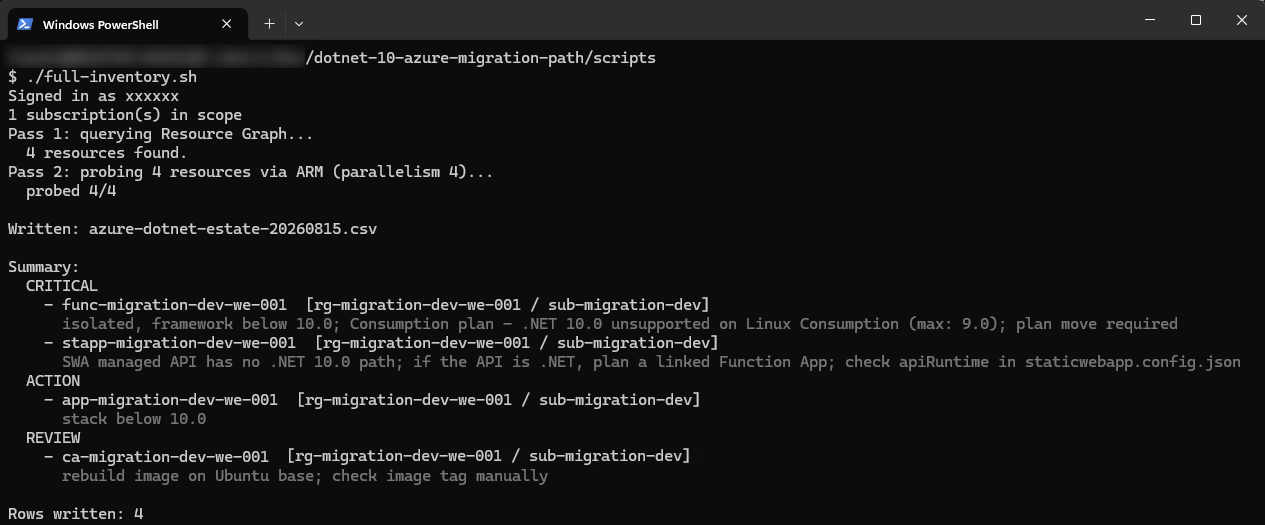
Bonus: The target version is a parameter in
full-inventory.sh(-t 8.0,-t 10.0, ...), not hard-coded. This means the same script will also run during the next migration wave, such as from .NET 10 to .NET 12 in 2028.
Step 2: Bump the target framework
The framework itself is a single property:
<PropertyGroup>
  <TargetFramework>net10.0</TargetFramework>
</PropertyGroup>
Update the NuGet packages in the same commit. ASP.NET Core and Entity Framework Core packages should match the target major version. For larger solutions, the .NET Upgrade Assistant can help:
dotnet tool install -g upgrade-assistant
upgrade-assistant upgrade ./Solution.sln
This part of the migration is often quick, which makes the total effort easy to underestimate. A successful build validates the code, not the target Azure platform configuration.
Consider enabling TreatWarningsAsErrors before the migration, ideally in a separate change so that existing warnings are resolved first. This makes new compatibility and deprecation warnings visible during the upgrade.
Do not use <RollForward>Major</RollForward> as a substitute for retargeting and testing. It can allow a framework-dependent .NET 8 application to start on an installed .NET 10 runtime without recompilation, exposing the application to runtime behavioral changes that the compiler has not checked.
Step 3: Rebuild container images
Starting with .NET 10, the default Linux distribution for .NET container tags has changed from Debian to Ubuntu 24.04 "Noble Numbat." Debian-based images are no longer the default. mcr.microsoft.com/dotnet/aspnet:10.0 therefore means something different than it did last year.
For an image without native dependencies, this may require only a rebuild. However, if the Dockerfile installs packages through apt-get, the build may fail because a Debian package name does not exist on Noble. Jaliya Udagedara described this in the post .NET 10 default container images changed from Debian to Ubuntu.
So every container gets rebuilt on a distribution nobody chose explicitly, at the same moment the framework changes underneath it. If your image installs additional packages, build it in a separate pull request and push it to the registry before you touch anything else. Any error then appears in the CI build, where it points at one change instead of two.
Pushing to the registry does not change a running revision. In a multi-stage build, the application must already target .NET 10, so step 2 must be complete before this image is built.
To illustrate the issue, here is a deliberately incorrect example that causes a runtime error.
<Project Sdk="Microsoft.NET.Sdk.Web">
  <PropertyGroup>
    <TargetFramework>net8.0</TargetFramework>
    <ImplicitUsings>enable</ImplicitUsings>
    <Nullable>enable</Nullable>
  </PropertyGroup>
</Project>
# Shows the error. DO NOT use as a template.
# Only the base image has been updated to .NET 10 here.
# The .csproj file still targets net8.0.
# Both the build and the push are successful.
FROM mcr.microsoft.com/dotnet/sdk:10.0-noble AS build
WORKDIR /src
COPY ["Project.csproj", "./"]
RUN dotnet restore "Project.csproj"
COPY . .
# Runs successfully: The build follows the TargetFramework specified
# in the *.csproj (net8.0), regardless of the SDK version included in the image.
RUN dotnet publish "Project.csproj" -c Release -o /app/publish
# The runtime image contains ONLY the .NET 10 runtime; it does not include any 8.x versions.
FROM mcr.microsoft.com/dotnet/aspnet:10.0-noble AS final
WORKDIR /app
COPY --from=build /app/publish .
ENV ASPNETCORE_HTTP_PORTS=8080
EXPOSE 8080
# It fails right here, at startup: the published application requires
# Microsoft.NETCore.App 8.x, but the image only offers 10.x.
ENTRYPOINT ["dotnet", "Project.dll"]Step 4: Roll out to Container Apps
Container Apps is the lowest-risk of the three platforms. Two runtime versions can serve production traffic at the same time, the split is adjustable in single-percent steps, and rolling back is a weight change rather than a deployment.
Precondition:
Traffic splitting requires the Container App to run in multiple revision mode. In the default single revision mode, deploying a new image deactivates the previous revision immediately, and the weighted rollout below never happens. Switch the mode once before the first deployment:
az containerapp revision set-mode multiple \
  --name <app> --resource-group <rg>
Deploy the new .NET 10 image as a new revision, then use the Azure CLI to weight requests toward it.
az containerapp update \
  --name <app> --resource-group <rg> \
  --image <registry>.azurecr.io/<app>:<build-tag> \
  --revision-suffix net10

az containerapp ingress traffic set \
  --name <app> --resource-group <rg> \
  --revision-weight <current-revision>=90 <new-revision>=10
Raise the second weight over as many steps as you want. Rolling back is the same command with the weights returned to <current-revision>=100, which takes effect without a new deployment.
Two things to watch during the rollout. Re-measure cold start on the Noble image before you reuse the readiness probe timings you tuned on Debian. And split your dashboards and log queries by revision. Otherwise, the error rate of the new version could be overlooked in the data volume of the old revision as long as its share of traffic is still low.
Step 5: Migrate Azure App Service
.NET 10 (LTS) is available on Windows and Linux App Service. Where the App Service plan supports deployment slots (Standard tier and above), use a staging slot to validate the deployment before swapping it into production. On plans without slot support, the stack update and the deployment hit the production instance as two separate operations. This leaves a window in which the platform image and the deployed code don't match. Keep that window short and scripted. If the application can't tolerate the brief mismatch, upgrading the plan to Standard for the duration of the migration is cheaper than an outage.
# Both Windows and Linux: create the staging slot once
az webapp deployment slot create \
  --name <app> --resource-group <rg> --slot staging

# Linux only: select the .NET 10 platform image for the slot
az webapp config set --name <app> --resource-group <rg> \
  --slot staging \
  --linux-fx-version "DOTNETCORE|10.0"

# Windows only: update the stack metadata
az webapp config set --name <app> --resource-group <rg> \
  --slot staging \
  --net-framework-version v10.0

# Deploy and validate the .NET 10 build in the staging slot, then swap it
az webapp deployment slot swap \
  --name <app> --resource-group <rg> \
  --slot staging --target-slot production
The slot workflow applies to both operating systems. On Linux, linuxFxVersion additionally selects the platform image. If a slot points to the .NET 10 image while framework-dependent .NET 8 code is deployed, the application will not start. Windows App Service already has all supported .NET runtimes installed side by side, so the deployed application's target framework selects the runtime. The property netFrameworkVersion should be set to v10.0 anyway. The app runs without it, but the stack metadata then still reports the old version. A migrated app with stale metadata reappears as an open item in the next inventory run.
In both cases, deploy and test the .NET 10 build in the staging slot before running the swap command.
Step 6: Migrate Azure Function Apps
.NET 10 support for Function Apps has been generally available since February 2026. It is available exclusively in the isolated worker model on all Windows and Linux plans except Linux Consumption.
Microsoft's migration guide recommends .NET 8 as an intermediate isolated-worker target:
We recommend upgrading to .NET 8 on the isolated worker model. This provides a quick migration path to the fully released version with the longest support window from .NET. This guide doesn't present specific examples for .NET 10 or .NET 9. Source: Migrate .NET apps from the in-process model to the isolated worker model
When Microsoft created this guide, .NET 8 still had a long runtime life ahead of it, which is no longer the case. .NET 8 Isolated loses support on the same day as the in-process model. Follow the guide to the letter and you complete the harder half of the work while ending up on a runtime that stops receiving patches on the cutoff date.
If the model change alone poses a risk to an application, switch first to .NET 8 Isolated and then to .NET 10. This spreads the risk across two smaller releases. Both releases still have to be done before November.
Migrating a Function App begins in the project file and requires more than a single line of code. TargetFramework, AzureFunctionsVersion, and OutputType must all match the expected parameters.
<PropertyGroup>
  <TargetFramework>net10.0</TargetFramework>
  <AzureFunctionsVersion>v4</AzureFunctionsVersion>
  <OutputType>Exe</OutputType>
</PropertyGroup>
The Worker NuGet packages must be at least version 2.x. Older versions do not support .NET 10 and fail the build.
<ItemGroup>
  <PackageReference Include="Microsoft.Azure.Functions.Worker" Version="2.52.0" />
  <PackageReference Include="Microsoft.Azure.Functions.Worker.Sdk" Version="2.1.0" />
  <PackageReference Include="Microsoft.Azure.Functions.Worker.Extensions.Http.AspNetCore" Version="2.1.1" />
</ItemGroup>
In the in-process model, the runtime loads your assembly and provides the host implicitly. The isolated worker model does not. You provide the host yourself, which is why an isolated project has a Program.cs, in the minimal case this one:
var builder = FunctionsApplication.CreateBuilder(args);
builder.ConfigureFunctionsWebApplication();
builder.Build().Run();
The second line is already a decision. ConfigureFunctionsWebApplication() enables ASP.NET Core integration. As a result, HttpContext is available, and HttpRequest and IActionResult continue to work. Without this call, the default mode is used, in which HTTP triggers use HttpRequestData and HttpResponseData instead. If your handlers already use ASP.NET Core types, enable the integration and this step is done quickly.
The hosting difference also explains why HttpRequest works out of the box in the in-process model. In the isolated model you either switch to HttpRequestData or enable the ASP.NET Core integration shown above. Output bindings that use the legacy out parameter must be updated to attribute-based bindings, and the namespace of the Durable Functions orchestration context must be updated.
Two APIs disappear without a direct replacement: IBinder and IAsyncCollector<T>. Imperative bindings and collector-style output have no equivalent attribute to switch to. Anything built on them needs the corresponding SDK client injected instead. That is a change to the code structure, not to an attribute. Both break the build, so you find them on the first compile.
The hosting configuration has to change in the same deployment as the code. Change FUNCTIONS_WORKER_RUNTIME while a .NET 8 in-process application is still running and the host restarts, then waits for an isolated worker process that the in-process assembly never starts. The reverse case is just as broken: the code deploys successfully and registers no functions.
Where the hosting plan supports them, deployment slots let you stage these coupled changes and reduce downtime:
# Create the slot once
az functionapp deployment slot create \
  --name <app> --resource-group <rg> --slot staging

# Configure the slot-specific function worker runtime
az functionapp config appsettings set \
  --name <app> --resource-group <rg> --slot staging \
  --settings FUNCTIONS_WORKER_RUNTIME=dotnet-isolated

# Linux only
az functionapp config set \
  --name <app> --resource-group <rg> --slot staging \
  --linux-fx-version "DOTNET-ISOLATED|10.0"

# Windows only
az functionapp config set \
  --name <app> --resource-group <rg> --slot staging \
  --net-framework-version v10.0

# Deploy .NET 10 artifact and swap slots
az functionapp deployment slot swap \
  --name <app> --resource-group <rg> --slot staging --target-slot production
Check whether
FUNCTIONS_WORKER_RUNTIMEis marked as a slot setting before you swap. Slot settings stay with the slot, so production keeps the old worker model while the new code lands on top of it. Nothing in the portal flags the mismatch; the app simply registers no functions.
These steps get the app deployed and running again, but they do not finish the move. In-process code carries assumptions that the isolated model no longer supports. Some appear only at runtime: ILogger is no longer injected as a function-method parameter, Newtonsoft attributes such as [JsonProperty] are ignored when the worker uses its default System.Text.Json serializer, and configuration is split between host.json and the worker process. A follow-up article starts with a Function App running on the isolated worker and covers the remaining changes.
One plan is a dead end. Linux Consumption will not receive a .NET 10 update. Microsoft retires the plan on September 30, 2028, but it is effectively frozen today: no new features or language versions will be added, and .NET 9 is the last .NET version it supports. Windows Consumption is not currently affected. For a Linux Consumption app that needs .NET 10, the documented migration path is a new Function App on Flex Consumption, including the resources and configuration that app requires.
What order to work in
No single product document specifies the order of the six steps above, so here are the three rules that decide it. Run the sequence against a non-production subscription once before you use it on anything that serves traffic.
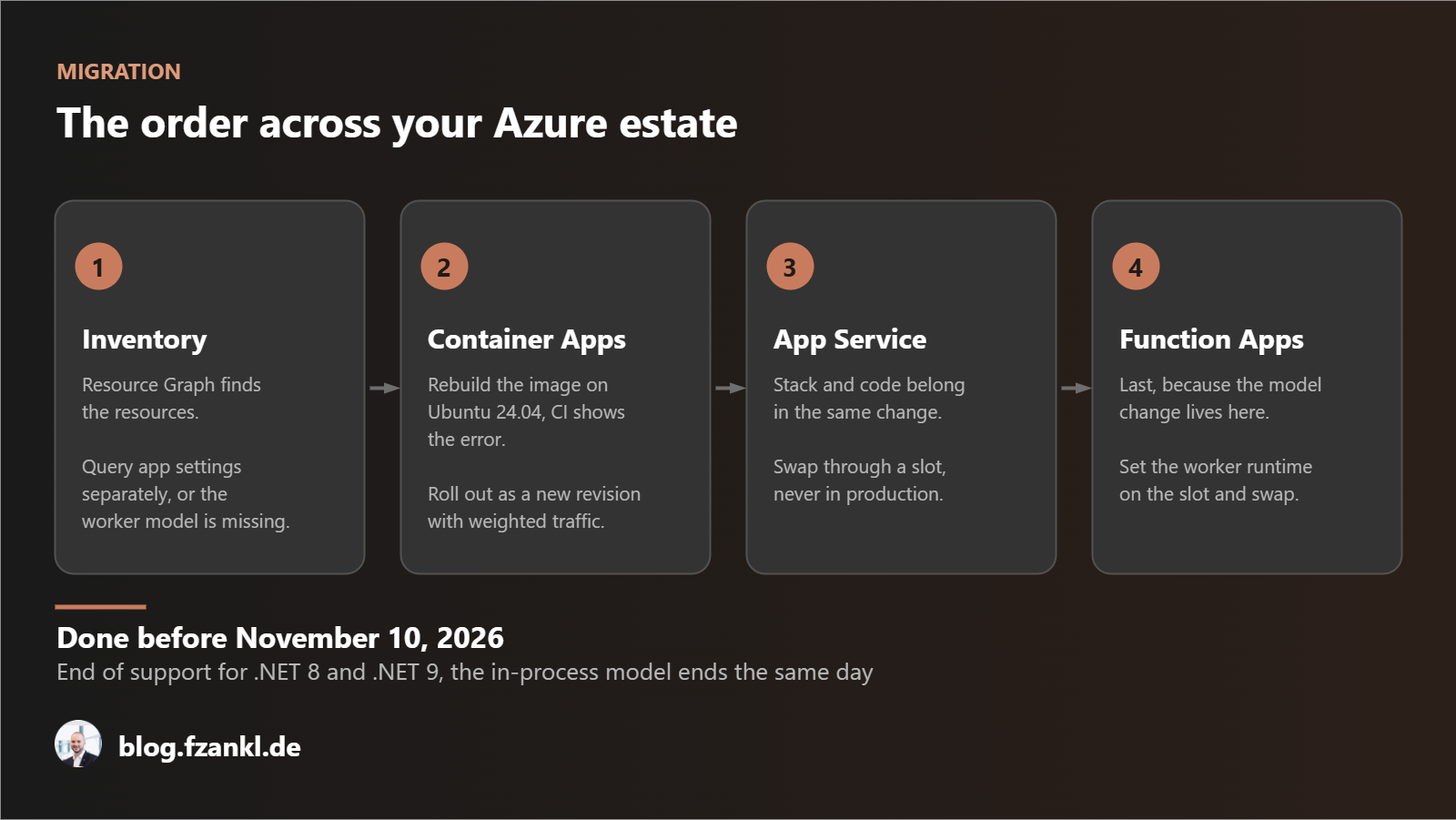
Infrastructure and code ship together. A stack set to .NET 10 with .NET 8 code deployed stops a Linux application from starting, and .NET 10 code on an in-process configuration produces a Function App that registers nothing. Use a deployment slot for App Service and Function Apps and a new revision for Container Apps, so each pair travels as one change with one rollback.
Containers come before platform stacks. A newly built image surfaces the Ubuntu switch during CI, where the only thing that changed is the image.
Function Apps come last. The model change is the one step you confirm by invoking a function rather than by reading a configuration blade, and it is the step most likely to require a new Azure resource when a move to Flex Consumption is necessary.
Wrapping up
Retargeting to .NET 10 is usually quick. Most of the effort sits in the platform configuration around it: a Function App that starts again is not a Function App that has finished the move. A follow-up article will cover the remaining code changes. A container rebuild absorbs an OS base-image change at the same time. Roll out one revision or slot at a time, using weighted traffic on Container Apps and slot swaps on App Service and Function Apps. Take inventory this month and November is a planned milestone rather than a release that contains every change at once.
The complete example is available on GitHub, including Terraform with the relevant Function App settings, the two-stage inventory script, and a Dockerfile showing a before-and-after comparison: Example of Migrating Azure Workloads to .NET 10.
Support windows are non-negotiable. Whether you choose the cautious or the fast approach makes no difference to the deadline. If you implement this in your environment, I'd be interested to know which application took the longest and where the estimate was off.
References
- .NET 8 and .NET 9 will reach End of Support on November 10, 2026
- .NET 11 release notes and support policy
- Migrate .NET apps from the in-process model to the isolated worker model
- Compare Azure Functions runtime versions
- Consumption plan for Azure Functions
- Guide for running C# Azure Functions in an isolated worker process
- Jaliya Udagedara: .NET 10 default container images changed from Debian to Ubuntu
- Default .NET container tags now use Ubuntu
- Introduction to Azure Resource Graph for App Service
- Language runtime support policy for Azure App Service