Flex Consumption wins, except for your batch jobs
For Azure Functions on the Linux Consumption plan, .NET 9 is the last supported .NET version. If you want to use .NET 10 or later, you need to switch to a different plan. The Linux Consumption plan retires on September 30, 2028, so every app on it has to move by then. Support for .NET 8 and .NET 9 will end on November 10, 2026. Microsoft's migration guide leads you to the Flex Consumption plan. This is the right choice for many applications, but it may be more expensive or unsuitable for some.
I ran the same application on Flex Consumption, Azure Functions on Container Apps, and plain Container Apps for four days. I measured cold starts over HTTP, how punctually timers fire, and what happens when a function run fails. I also checked how the three targets react when a deployment is missing a setting, and what changes for networking and billing. The results tell you which of the three fits your Function App.
If your application is still running on the in-process model, migrating to the isolated worker model is the first step. My article Your Function App says 200, your data disagrees covers this process.
What I compared
For this comparison, I chose three Linux-based targets that are capable of scaling down to zero. I left out Premium and Dedicated plans with Always On, as these keep instances running constantly and incur corresponding charges. My post from October 13th covers when one of these plans is the right choice.
The table summarizes the results. The sections below explain each row.
| Flex Consumption | Azure Functions on Container Apps | Plain Container Apps and Jobs | |
|---|---|---|---|
| Cold start from zero (median) | 1.62 s | 23.30 s | 21.86 s |
| Scaling unit | function group | entire app, each replica runs all functions | each container app and job individually |
| Ten-minute timer, 552 ticks | 551 ran, all on time | 552 ran, four late, up to 243 s | 552 ran, start median 21 s after the minute |
| Protection against parallel execution | yes, singleton lock | yes, singleton lock, even with two replicas | no |
| Retry after failure | not by default | not by default | yes, via replicaRetryLimit |
| Deployment without downtime | no slots, rolling updates (not with a single instance) | revisions | revisions (only the container app) |
| Missing setting, deployment reports success | HTTP 404 | crash loop, HTTP 401 | old revision responds with HTTP 200 |
| Incoming private endpoint | on the app | on the environment | on the environment |
| Code at startup | zip package from storage | image, 371 MB | image, 95 MB |
The app under test is herald, a small service that publishes scheduled posts from a repository. For the comparison, a minimal version ran with three functions that only log their startup. PublishScheduledPosts runs every ten minutes, CheckTokenExpiry daily at 06:00 UTC, and RunNow via HTTP. Plain Container Apps have no Functions host, so RunNow becomes a container app that serves HTTP, and the two timers become jobs with a cron schedule.
All three targets ran in Germany West Central. Flex Consumption had 2048 MB per instance and no Always Ready instances. Both container targets had 1 vCPU and 2 GiB per replica in the Consumption workload profile and scaled between zero and ten replicas.
I measured cold starts in 20 rounds over HTTP. The rounds were about 23 minutes apart, so the calls fell at different points of the timers' ten-minute cycle. I analyzed the timers from Application Insights and the Container Apps system log.
Cold start
The cold start behavior depends on how the targets implement hosting and scaling.
Flex Consumption doesn't scale the whole app. It scales groups of functions. Functions with HTTP, Blob, or Durable triggers each form their own group, and every other function scales independently. This means that HTTP calls never land on a timer instance. The other two targets scale via their replicas.
Flex Consumption usually responded to HTTP requests from a cold start in under two seconds, even though almost every request was served by a fresh instance. On this fresh instance, the host was up within a few milliseconds. This suggests that Flex Consumption takes over a prepared instance instead of starting a host from scratch.
For the ten-minute timer, Flex Consumption starts an instance about a minute and a half before the scheduled time and terminates it after the run. Because of the scaling groups, the HTTP function doesn't benefit from that instance and was cold on 19 of 20 requests after a pause, even though the application runs every ten minutes.
Flex Consumption has a fixed upper limit. According to the documentation, the application initialization fails after a predefined 30 seconds. Because almost every HTTP request is served by a fresh instance, almost every request goes through this initialization. If your application loads large amounts of data during startup, a slow cold start turns into a failed one.
The two container targets are clearly slower than Flex Consumption for cold starts. From zero replicas, both took over 20 seconds, and individual requests took up to just over 30 seconds. If the node has to pull the image first, the pull adds to the cold start. In my measurements, pulling the 371 MB Functions image usually took a few seconds, but occasionally over a minute. The 95 MB image of the plain Container App took 18 seconds at most.
On Functions on Container Apps, RunNow responded in under one second if a replica was running. Often, a replica was already running without an HTTP request triggering it. The ten-minute timer starts it, and because this target has a replica that hosts the entire application, the HTTP function runs within it. KEDA starts the application one minute before the scheduled time and allows it to run for about five minutes afterward. So the cold start on Functions on Container Apps depends heavily on which timers your app has, if any.
Timers
The punctuality of a timer depends on who starts the instance and which options are enabled.
The graph shows when an instance runs around a ten-minute tick on each of the three targets, using the median values from the measurements.
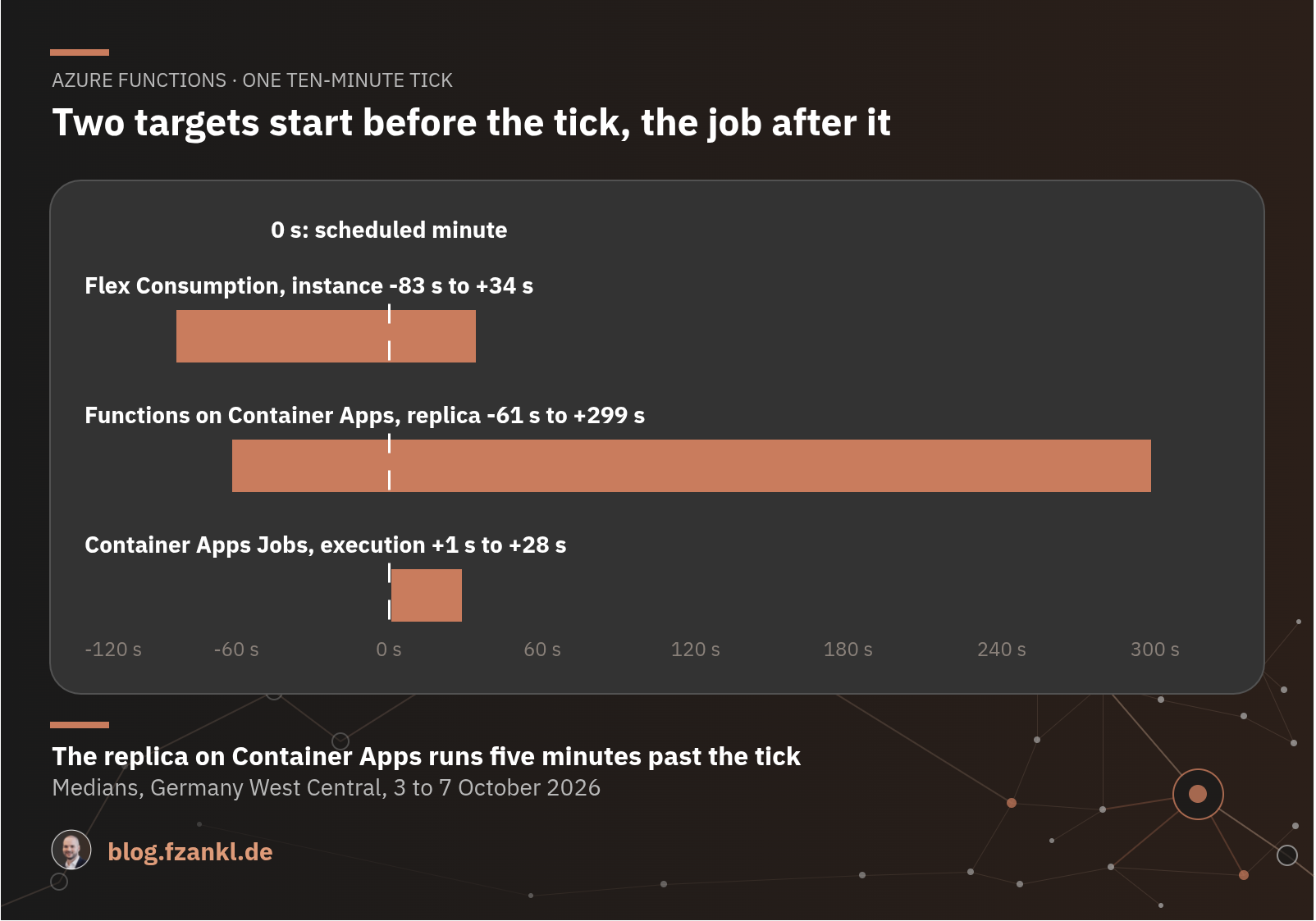
In the Dedicated plan, Microsoft recommends the Always On option to ensure reliable function execution. Without this option, the runtime goes to sleep after a few minutes and only restarts with an HTTP request. In Flex Consumption, the equivalent is Always Ready, which is a cost-benefit trade-off rather than a functional requirement. The daily timer in the measurement ran punctually every day without Always Ready. So Always Ready matters when the approximately two-second cold start is too long, not to make timers fire.
Flex Consumption did not start every tick. The tick scheduled for October 5th at 17:00 UTC did not run. The instance for that tick had started and logged 17:00 as the next scheduled time. However, the actual execution did not occur, and the instance was shut down shortly after the scheduled time. No other instance took over the tick. Over 26 days on the two production herald instances, only one other tick out of approximately 7,500 exhibited the same pattern. If every tick is critical, you need monitoring.
On Functions on Container Apps, four of 552 ticks ran up to four minutes late. Three of these ran on a replica that first had to download the Functions image. The minute that KEDA gives the replica to start before the tick is only sufficient if the node already has the image.
With two replicas in Functions on Container Apps, each tick ran exactly once, always on the same replica. The second replica was running in the background but did not write a single trace line. The Functions host therefore also brings its singleton lock to Container Apps. It ensures that a timer only runs once across all instances and that a new run does not start until the previous one has finished.
In plain Container Apps, a job started its code a median of about 20 seconds after the scheduled minute, with outliers exceeding one minute. If your schedule can tolerate this offset, jobs play to their strength: retries. A job that fails on purpose started three containers within just over a minute and a half, and then the execution stopped at Failed. That is replicaRetryLimit set to 2. A Functions timer does not retry a failed run by default.
In plain Container Apps, there is no protection against parallel runs. A job with three minutes of work on a two-minute schedule started each run on time, while the previous one was still running, even though parallelism was set to 1. This setting only determines how many replicas a single execution starts in parallel, not how many executions can run simultaneously. With parallelism = 5, each execution starts five replicas, which can share work, for example when each one takes its own messages from the same queue. If your run can take longer than its interval, you need your own locking mechanism, such as a blob lease.
In Terraform, the schedule, retry, and parallelism settings are all part of the same job resource. The following excerpt is from the job for the retry test.
resource "azurerm_container_app_job" "throw" {
  # ...
  replica_timeout_in_seconds = 300
  replica_retry_limit        = 2

  # Cron expressions of jobs have five fields and run in UTC.
  schedule_trigger_config {
    cron_expression          = "5,35 * * * *"
    parallelism              = 1
    replica_completion_count = 1
  }
  # ...
}
Deployment
Whether a deployment goes out without downtime depends on the release itself and on how the target rolls out the new version.
Deployment slots are not available on any of the three targets. If your release process currently relies on a slot swap, you need a new release path, not just a new plan.
On Flex Consumption, a site update strategy takes the place of slots. The default is Recreate, and rolling updates are the zero-downtime option. If the app only runs on a single instance, there will be a brief interruption even with rolling updates, similar to Recreate, but any ongoing executions will be completed before the new release is applied. The availability of rolling updates in a specific region is described inconsistently on Learn. The page for the Flex Consumption plan calls it a public preview, while the page for Site Updates mentions regions where it is generally available.
Azure Functions on Container Apps uses revisions. The default is single mode, with one active revision. Traffic splitting is only available in multiple mode. Multiple mode has a catch. With multiple active revisions, each revision requires its own storage account, and for pull triggers like Queue Storage or Service Bus, it also requires its own event source. If this configuration is missing, the revisions will compete for the same messages.
In plain Container Apps, only the Container App has revisions. A job is a separate resource with its own executions. The Container App creates a new revision whenever the image, container configuration, or scaling rules change, and in single mode it deactivates the old revision only after the new one is ready.
I omitted the same setting on all three targets, and without it, the app wouldn't start. The deployment reported success everywhere, but the three targets behaved differently. Flex Consumption responded to RunNow with HTTP 404. The plain Container App created a new revision, which ended in ActivationFailed, and the old revision continued to respond with HTTP 200. Functions on Container Apps kept the new revision in a crash loop and responded with HTTP 401 for the previously valid host key. The old revision continued to run and, according to the system log, had 100% of the traffic, but it still didn't respond to the request.
According to the Microsoft documentation, in single mode, traffic remains on the old revision if an update fails. This was the case with the plain Container App, but not with Functions on Container Apps. I haven't figured out why. After a deployment, check whether your app responds as expected, rather than relying on a successful deployment or the platform's fallback mechanism.
Networking
Where the incoming private endpoint attaches differs between the targets.
In Linux Consumption, there is no incoming private endpoint, only access restrictions. In Flex Consumption, the endpoint attaches to the individual app.
On both Container App targets, the endpoint attaches to the environment, not to the app. With public access disabled, requests from outside get HTTP 403. This setting applies to all apps in the environment. If you need a private endpoint for individual apps after migrating, you can only get it in Flex Consumption. In Container Apps, apps with different visibility require separate environments.
Cost
The cost of a target depends less on the price per second and more on how long an instance exists for a run and what else is running alongside the app.
The graph in the Timers section shows how long an instance runs per execution.
Flex Consumption charges for the execution time and memory of running instances. Instances can scale down to zero on this plan. The timer instance ends with the execution. The Always Ready option changes this, because you pay for the provisioned instance even without load.
On both Container App targets, running replicas are billed at the active rate, and Functions on Container Apps follows the Container Apps pricing model. A cheaper idle rate only applies to replicas you keep running with minReplicas. If the app scales down to zero, as in my measurement, every running replica is billed at the active rate.
Two costs of Functions on Container Apps don't appear in any pricing table. The replica that a timer starts runs for about six minutes per tick, counting the minute of lead time and the cooldown window, and is billed at the active rate the whole time. Additionally, this target sends the console logs of the Functions image to Log Analytics, alongside Application Insights. The Functions Container App wrote about 25 MB per day to ContainerAppConsoleLogs_CL, even though the host's console output was disabled and the three functions only logged their startup. The data comes from platform events of the Functions image, which it writes to stdout regardless of this setting.
On plain Container Apps, the Container App that serves HTTP is also billed as an active instance. Jobs are billed only for their runtime.
Both container targets come with cost items that Flex Consumption doesn't have. The images require a container registry. For a private endpoint on a Container Apps environment, in addition to the standard costs of the endpoint, there is a separate "Dedicated Plan Management" charge with an hourly rate, even in the Consumption profile.
Migration
Make one change at a time, so you know which step caused the error. Migrate to the isolated worker while the app is still running on Linux Consumption, as .NET 8 isolated is available there. Then switch plans, staying on the same .NET version. Finally, target .NET 10, as Linux Consumption only supports up to .NET 9. Check the points mentioned in Your Function App says 200, your data disagrees after switching to the isolated worker.
There is no in-place migration from Linux Consumption to Flex Consumption. The switch requires a new app with a new deployment.
Switching to Flex Consumption has two pitfalls. The platform does not support WEBSITE_TIME_ZONE or TZ. Timers run in UTC on Flex Consumption, just like the cron expressions for Jobs. If your app has a time zone set on Linux Consumption, its timers will run at a different time after the migration without any adjustments. Blob triggers only work with Event Grid as the source on Flex Consumption. The default container polling LogsAndContainerScan is not supported on Flex Consumption.
Learn describes no migration path to the two container targets, unlike the one for Flex Consumption. For Functions on Container Apps, you create a container image from the unmodified app and then create a Container App. For plain Container Apps, you split the app. The HTTP functions become a Container App, and the timers become Jobs.
The following excerpt shows the Container App for Functions in the measurement. The key part is kind = "functionapp". Because azurerm_container_app does not know this argument in version 5.5.0, the app is created with azapi.
resource "azapi_resource" "functions_app" {
  type = "Microsoft.App/containerApps@2025-07-01"
  # ...
  body = {
    kind = "functionapp"
    properties = {
      # ...
      template = {
        # ...
        scale = {
          minReplicas = 0
          maxReplicas = 10
        }
      }
    }
  }
}
Wrapping up
I ran the same app on Flex Consumption, Azure Functions on Container Apps, and plain Container Apps with Jobs, and compared cold starts, timers, retries, deployments, networking, and cost. Which target is the best fit depends on how your app is invoked, what a run needs, and how you deploy it.
Flex Consumption is the default choice for HTTP triggers and timers. Function Apps on this plan usually respond from a cold start in under two seconds, while both Container App targets take over 20 seconds. Functions on Container Apps is worth it if you need revisions with traffic splitting. Container Apps Jobs fit batch processing. A run can start several replicas through parallelism, while a Functions timer only runs on a single instance, and with replicaRetryLimit a failed run is retried without custom code.
If you have moved a Function App off Linux Consumption, I would like to hear which target it landed on and why.
References
- Azure Functions hosting options
- Azure Functions Flex Consumption plan hosting
- Azure Functions Consumption plan hosting
- Azure Functions on Azure Container Apps overview
- Jobs in Azure Container Apps
- Use a private endpoint with an Azure Container Apps environment
- Your Function App says 200, your data disagrees